> ## Documentation Index
> Fetch the complete documentation index at: https://perfgrid.com/docs/llms.txt
> Use this file to discover all available pages before exploring further.

# Add google-site-verification TXT record to domain

> PerfGrid knowledge base article in DNS.

<Tip>The same idea applies to **Facebook Business Manager** verification (**facebook-domain-verification**).</Tip>

Sometimes you must **verify domain ownership** at Google (Search Console, Google Workspace, and similar) by publishing a **TXT** record, for example:

```text theme={null}
google-site-verification=<random_characters>
```

<iframe src="https://iframe.mediadelivery.net/embed/6032/01182238-360d-442f-b054-6eb0fba3fdb1?autoplay=false" allowFullScreen="true" />

## Text guide

<Steps>
  <Step title="Open Zone Editor">
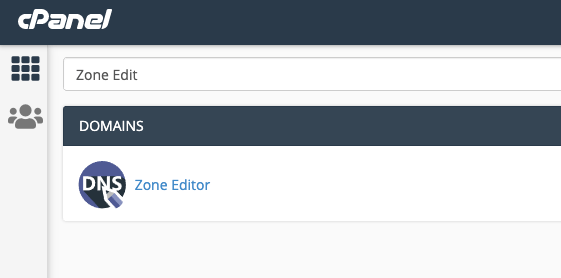
    In **cPanel**, open **Zone Editor** under **Domains**.
    <Frame>
      <img src="https://mintcdn.com/perfgrid/15iMcglqmGInykGW/images/kb/cpanel/dns/add-google-site-verification-txt-record-to-domain/fcfuhhzs0bxy0kruyxzkwg6t4lchy7ysptaaivgsiy.png?fit=max&auto=format&n=15iMcglqmGInykGW&q=85&s=d2128f22a09b5dfa35b263ea7e159c6b" alt="cPanel Domains section with Zone Editor highlighted" style={{ borderRadius: '0.5rem' }} width="561" height="278" data-path="images/kb/cpanel/dns/add-google-site-verification-txt-record-to-domain/fcfuhhzs0bxy0kruyxzkwg6t4lchy7ysptaaivgsiy.png" />
    </Frame>
  </Step>

  <Step title="Manage the zone">
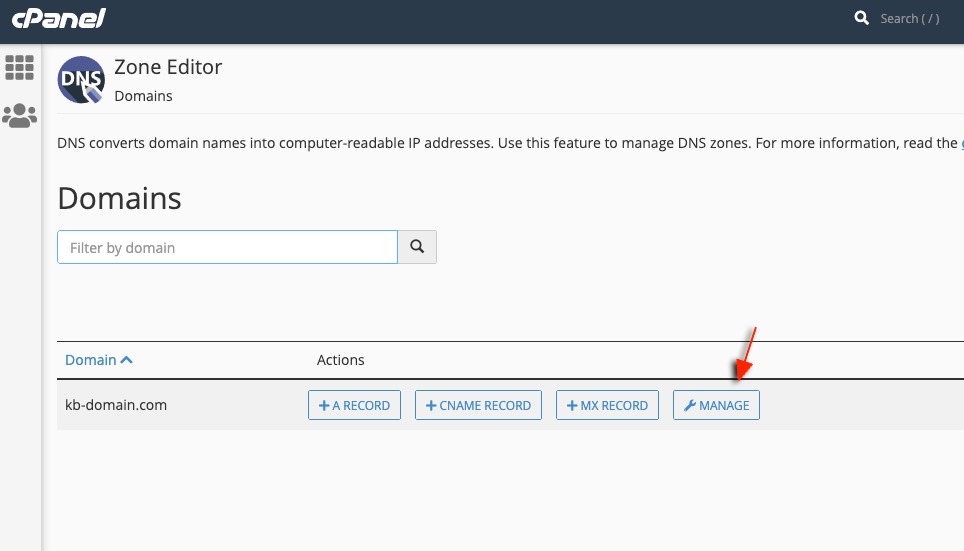
    Click **Manage** next to the domain you want to edit.
    <Frame>
      <img src="https://mintcdn.com/perfgrid/15iMcglqmGInykGW/images/kb/cpanel/dns/add-google-site-verification-txt-record-to-domain/vjnhbwgvkkpurx9mvasqtbvbvkc4vlczzcpyzy7xrx.png?fit=max&auto=format&n=15iMcglqmGInykGW&q=85&s=a51cae600f95de3861e3752198a78433" alt="cPanel Zone Editor domain list with Manage action" style={{ borderRadius: '0.5rem' }} width="964" height="551" data-path="images/kb/cpanel/dns/add-google-site-verification-txt-record-to-domain/vjnhbwgvkkpurx9mvasqtbvbvkc4vlczzcpyzy7xrx.png" />
    </Frame>
  </Step>

  <Step title="Add a TXT record">
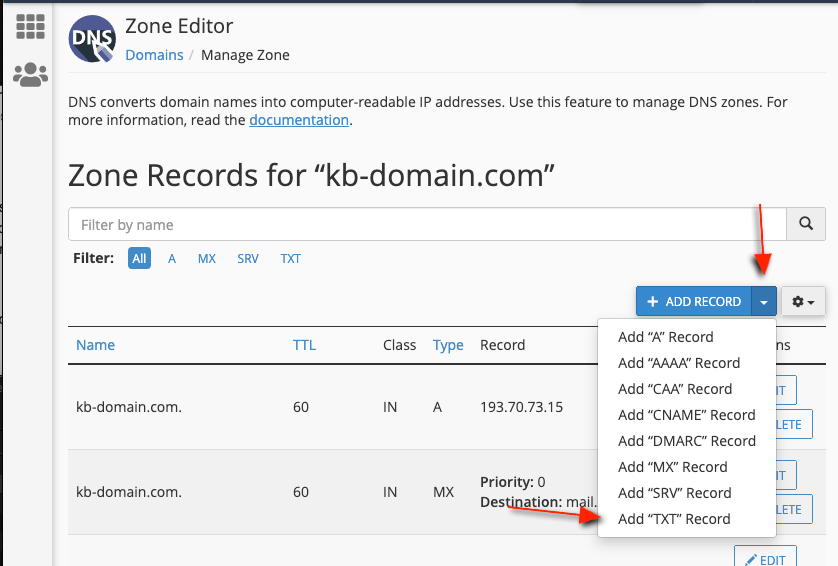
    Open the **Add Record** menu and choose **Add TXT record**.
    <Frame>
      <img src="https://mintcdn.com/perfgrid/15iMcglqmGInykGW/images/kb/cpanel/dns/add-google-site-verification-txt-record-to-domain/uwatfrggpxwuka54n72sh5rpbji4liodencphitjsf.png?fit=max&auto=format&n=15iMcglqmGInykGW&q=85&s=e9db2a486aeaaab06cff8c2fa7f24a87" alt="cPanel DNS record types with Add TXT record option" style={{ borderRadius: '0.5rem' }} width="838" height="566" data-path="images/kb/cpanel/dns/add-google-site-verification-txt-record-to-domain/uwatfrggpxwuka54n72sh5rpbji4liodencphitjsf.png" />
    </Frame>
  </Step>

  <Step title="Enter the verification string">
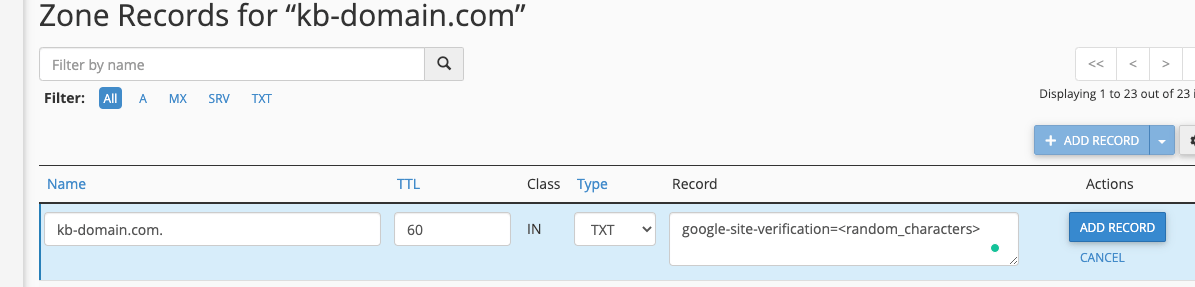
    Set **Name** to your domain (or **@** if your zone uses that convention), leave **TTL** at the default, set **Type** to **TXT**, and paste the full **google-site-verification=…** value into **Record**.
    <Frame>
      <img src="https://mintcdn.com/perfgrid/15iMcglqmGInykGW/images/kb/cpanel/dns/add-google-site-verification-txt-record-to-domain/hff8gczdkpdxtzt4qejhwpsvfmbghkeevfkyju4crh.png?fit=max&auto=format&n=15iMcglqmGInykGW&q=85&s=d9b9d3b819c463c44ad88bb98cbaa01b" alt="cPanel form for adding a TXT record with google-site-verification value" style={{ borderRadius: '0.5rem' }} width="1195" height="287" data-path="images/kb/cpanel/dns/add-google-site-verification-txt-record-to-domain/hff8gczdkpdxtzt4qejhwpsvfmbghkeevfkyju4crh.png" />
    </Frame>
  </Step>

  <Step title="Save">
    Click **Add Record**. Changes usually propagate across our nameservers within **10–15 seconds**.
  </Step>
</Steps>

## Related articles

* [Add custom include to SPF](/docs/cpanel/email/add-custom-include-to-spf)
