> ## Documentation Index
> Fetch the complete documentation index at: https://perfgrid.com/docs/llms.txt
> Use this file to discover all available pages before exploring further.
# Restart PHP
> Gracefully restart lsphp processes for your Grid Hosting account from the Domains page.
**Restart PHP** gracefully restarts the `lsphp` (LiteSpeed PHP) processes for your account. Use it when a site is stuck or a PHP process has crashed.
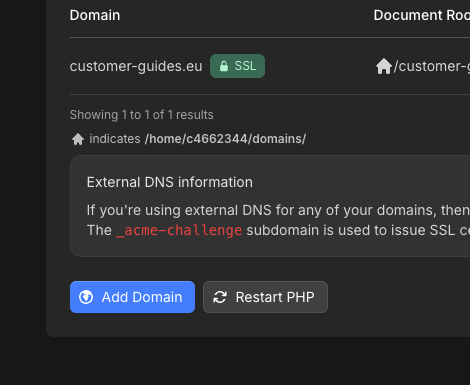
The control is on **Domains**, next to **Add Domain**. It applies to every site on the account, not one domain.
You can run it at most **once every 15 seconds**. The restart takes about **5 seconds**.
## Restart PHP
Log in to your hosting panel at [hosting-panel.net](https://hosting-panel.net).
Go to **Domains**. Click **Restart PHP** next to **Add Domain**.
 The modal says **This restarts PHP for every site on the account and interrupts in-flight requests.** Click **Restart PHP** to continue, or **Cancel**.
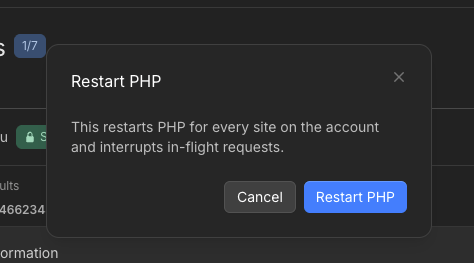 The restart interrupts in-flight PHP requests on every site on the account.
## Related articles
* [What PHP versions do you support?](/docs/grid-hosting/php/what-php-versions-do-you-support)
* [SSL certificate status](/docs/grid-hosting/domains/ssl-certificate-status)
The restart interrupts in-flight PHP requests on every site on the account.
## Related articles
* [What PHP versions do you support?](/docs/grid-hosting/php/what-php-versions-do-you-support)
* [SSL certificate status](/docs/grid-hosting/domains/ssl-certificate-status)