> ## Documentation Index
> Fetch the complete documentation index at: https://perfgrid.com/docs/llms.txt
> Use this file to discover all available pages before exploring further.
# Valkey Manager
> Activate a Valkey (Redis-compatible) instance in hosting-panel.net, set memory and eviction policy, and copy the socket path.
**Valkey Manager** runs a Valkey instance for your account. Valkey is a Redis-compatible key-value store. Activate it, set **Max Memory**, **Memory Eviction Policy**, and **Data Persistence**, then point your app at the **Socket Path** shown in the panel.
You can **Activate Valkey** and **Deactivate Valkey**. There is no flush control in the manager.
Go to **Tools** → **Valkey Manager**.
## Activate Valkey
Log in to your hosting panel at [hosting-panel.net](https://hosting-panel.net).
Go to **Tools** → **Valkey Manager**. While the instance is off, the page shows **Deactivated**.
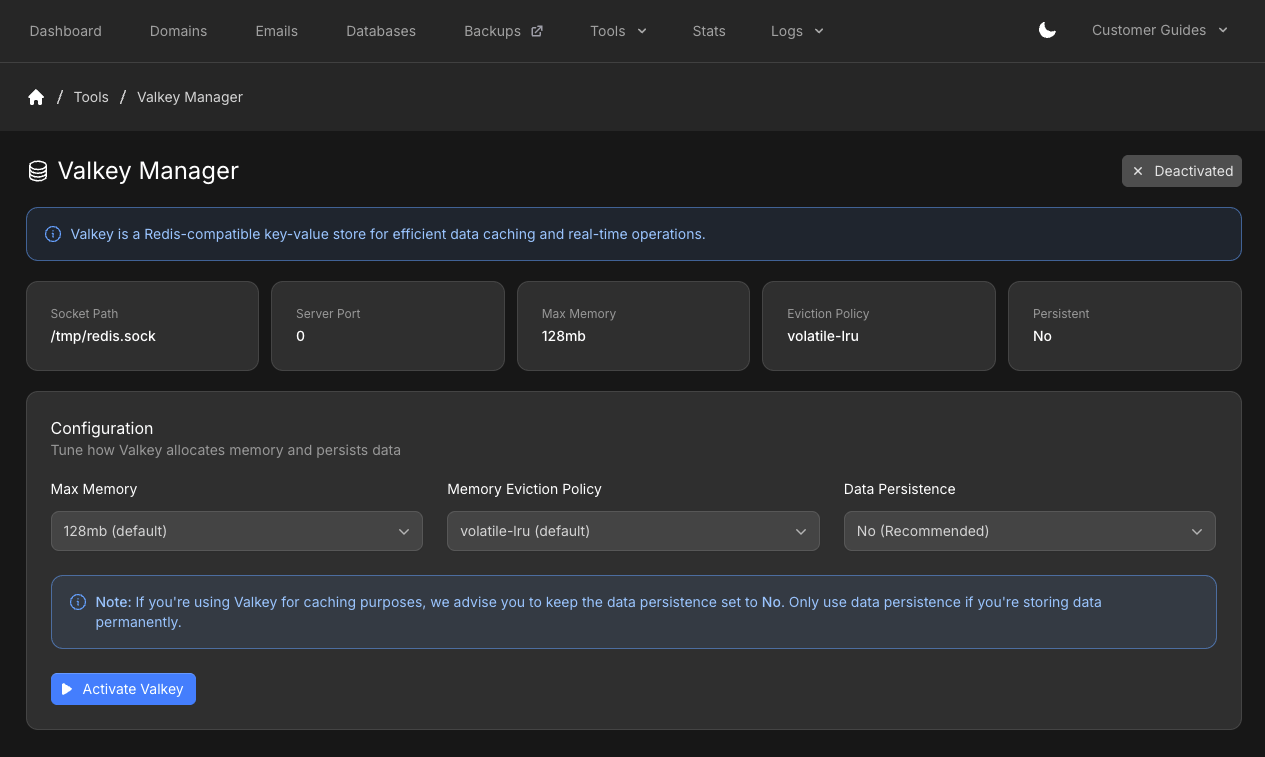 Under **Configuration**, choose:
* **Max Memory** — options depend on your plan (see the table below)
* **Memory Eviction Policy**
* **Data Persistence** — **No (Recommended)** for caching. Only turn persistence on if you store data you need after a restart
Click **Activate Valkey**. The page shows **Activated**, the same connection cards, and live metrics.
Copy **Socket Path** (for example `/tmp/redis.sock`) and **Server Port** (`0` for the Unix socket). Use those values in your application.
Under **Configuration**, choose:
* **Max Memory** — options depend on your plan (see the table below)
* **Memory Eviction Policy**
* **Data Persistence** — **No (Recommended)** for caching. Only turn persistence on if you store data you need after a restart
Click **Activate Valkey**. The page shows **Activated**, the same connection cards, and live metrics.
Copy **Socket Path** (for example `/tmp/redis.sock`) and **Server Port** (`0` for the Unix socket). Use those values in your application.
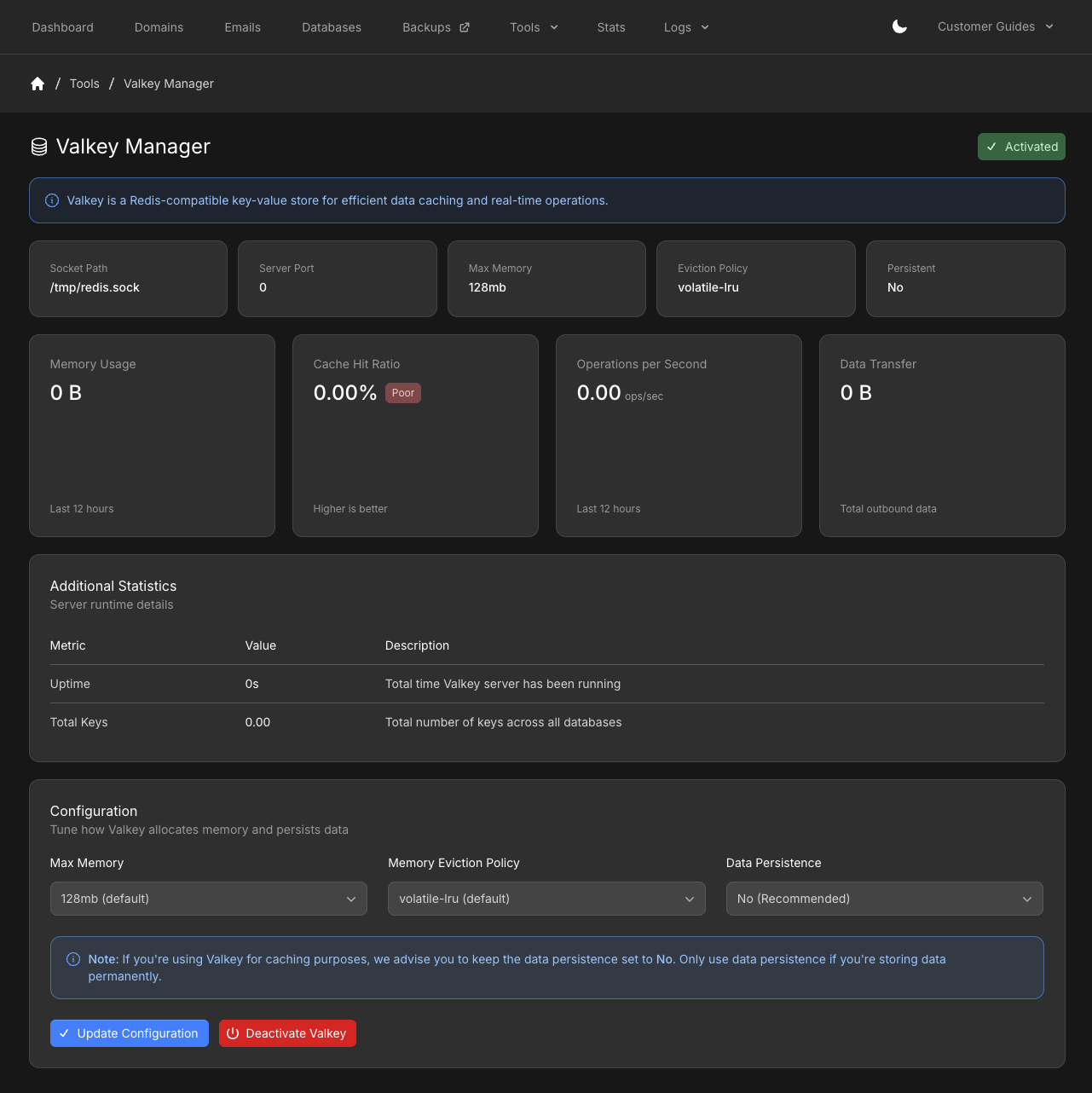 After activate, **Update Configuration** applies new memory, eviction, or persistence settings. **Deactivate Valkey** turns the instance off.
Max memory options by plan:
| Plan | Max memory options |
| ------ | -------------------------- |
| Micro | 128MB |
| Small | 128MB, 256MB |
| Medium | 128MB, 256MB, 384MB |
| Large | 128MB, 256MB, 384MB, 512MB |
Eviction policies:
| Policy | Meaning |
| ----------------- | ------------------------------------------------------ |
| `volatile-lru` | Evicts least recently used keys that have an expiry. |
| `noeviction` | Returns an error when memory is full. |
| `allkeys-lru` | Evicts least recently used keys, expiry or not. |
| `volatile-lfu` | Evicts least frequently used keys that have an expiry. |
| `allkeys-lfu` | Evicts least frequently used keys, expiry or not. |
| `volatile-random` | Evicts a random key that has an expiry. |
| `allkeys-random` | Evicts a random key, expiry or not. |
If you do **not** set a **TTL** on keys, use **`allkeys-lru`**. Otherwise the instance can return `Out of Memory` errors.
## Statistics
While Valkey is activated, the manager shows:
* **Memory Usage** (last 12 hours)
* **Cache Hit Ratio**
* **Operations per Second** (last 12 hours)
* **Data Transfer** (total outbound)
* **Uptime** and **Total Keys** under **Server runtime details**
## Use Valkey in your app
After the instance is running, follow [How do I use Redis / Valkey?](/docs/grid-hosting/general/how-do-i-use-redis-valkey) for WordPress, LiteSpeed Cache, Laravel, and Magento examples. Replace the example socket path with the **Socket Path** shown in Valkey Manager.
## Related articles
* [Do you offer Redis / Valkey?](/docs/grid-hosting/general/do-you-offer-redis-valkey)
* [How do I use Redis / Valkey?](/docs/grid-hosting/general/how-do-i-use-redis-valkey)
* [WordPress Site Overview](/docs/grid-hosting/wordpress/wordpress-site-overview)
After activate, **Update Configuration** applies new memory, eviction, or persistence settings. **Deactivate Valkey** turns the instance off.
Max memory options by plan:
| Plan | Max memory options |
| ------ | -------------------------- |
| Micro | 128MB |
| Small | 128MB, 256MB |
| Medium | 128MB, 256MB, 384MB |
| Large | 128MB, 256MB, 384MB, 512MB |
Eviction policies:
| Policy | Meaning |
| ----------------- | ------------------------------------------------------ |
| `volatile-lru` | Evicts least recently used keys that have an expiry. |
| `noeviction` | Returns an error when memory is full. |
| `allkeys-lru` | Evicts least recently used keys, expiry or not. |
| `volatile-lfu` | Evicts least frequently used keys that have an expiry. |
| `allkeys-lfu` | Evicts least frequently used keys, expiry or not. |
| `volatile-random` | Evicts a random key that has an expiry. |
| `allkeys-random` | Evicts a random key, expiry or not. |
If you do **not** set a **TTL** on keys, use **`allkeys-lru`**. Otherwise the instance can return `Out of Memory` errors.
## Statistics
While Valkey is activated, the manager shows:
* **Memory Usage** (last 12 hours)
* **Cache Hit Ratio**
* **Operations per Second** (last 12 hours)
* **Data Transfer** (total outbound)
* **Uptime** and **Total Keys** under **Server runtime details**
## Use Valkey in your app
After the instance is running, follow [How do I use Redis / Valkey?](/docs/grid-hosting/general/how-do-i-use-redis-valkey) for WordPress, LiteSpeed Cache, Laravel, and Magento examples. Replace the example socket path with the **Socket Path** shown in Valkey Manager.
## Related articles
* [Do you offer Redis / Valkey?](/docs/grid-hosting/general/do-you-offer-redis-valkey)
* [How do I use Redis / Valkey?](/docs/grid-hosting/general/how-do-i-use-redis-valkey)
* [WordPress Site Overview](/docs/grid-hosting/wordpress/wordpress-site-overview)