> ## Documentation Index
> Fetch the complete documentation index at: https://perfgrid.com/docs/llms.txt
> Use this file to discover all available pages before exploring further.
# WordPress Site Overview
> Manage plugins, FluentSMTP, and sender details from Site Overview in hosting-panel.net.
**Site Overview** is the management view for a WordPress site on **Tools** → **WordPress Installer**. You can see WordPress and PHP versions, manage **plugins**, provision mail with FluentSMTP, set the from name and address, and review known vulnerabilities.
Theme and WordPress core **updates** from this page are not available yet. Themes still appear in the overview so you can see which one is active.
The panel caches Overview data. Use the refresh control if you need a newer snapshot. The page shows when data was last updated.
## Open Site Overview
Log in to your hosting panel at [hosting-panel.net](https://hosting-panel.net).
Go to **Tools** → **WordPress Installer**.
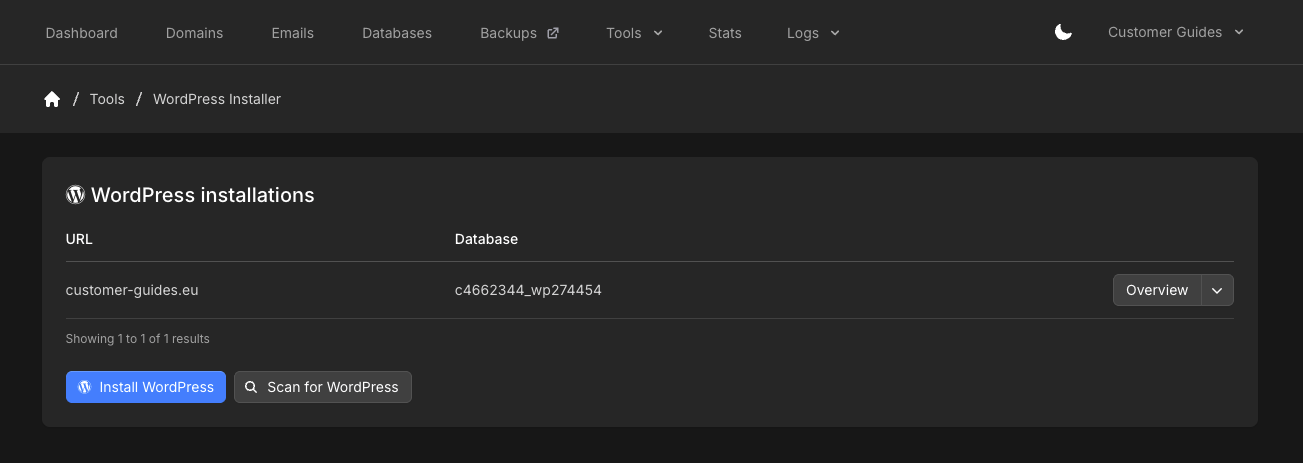
The **WordPress installations** list shows each site **URL** and **Database**. Click **Overview** on the row.
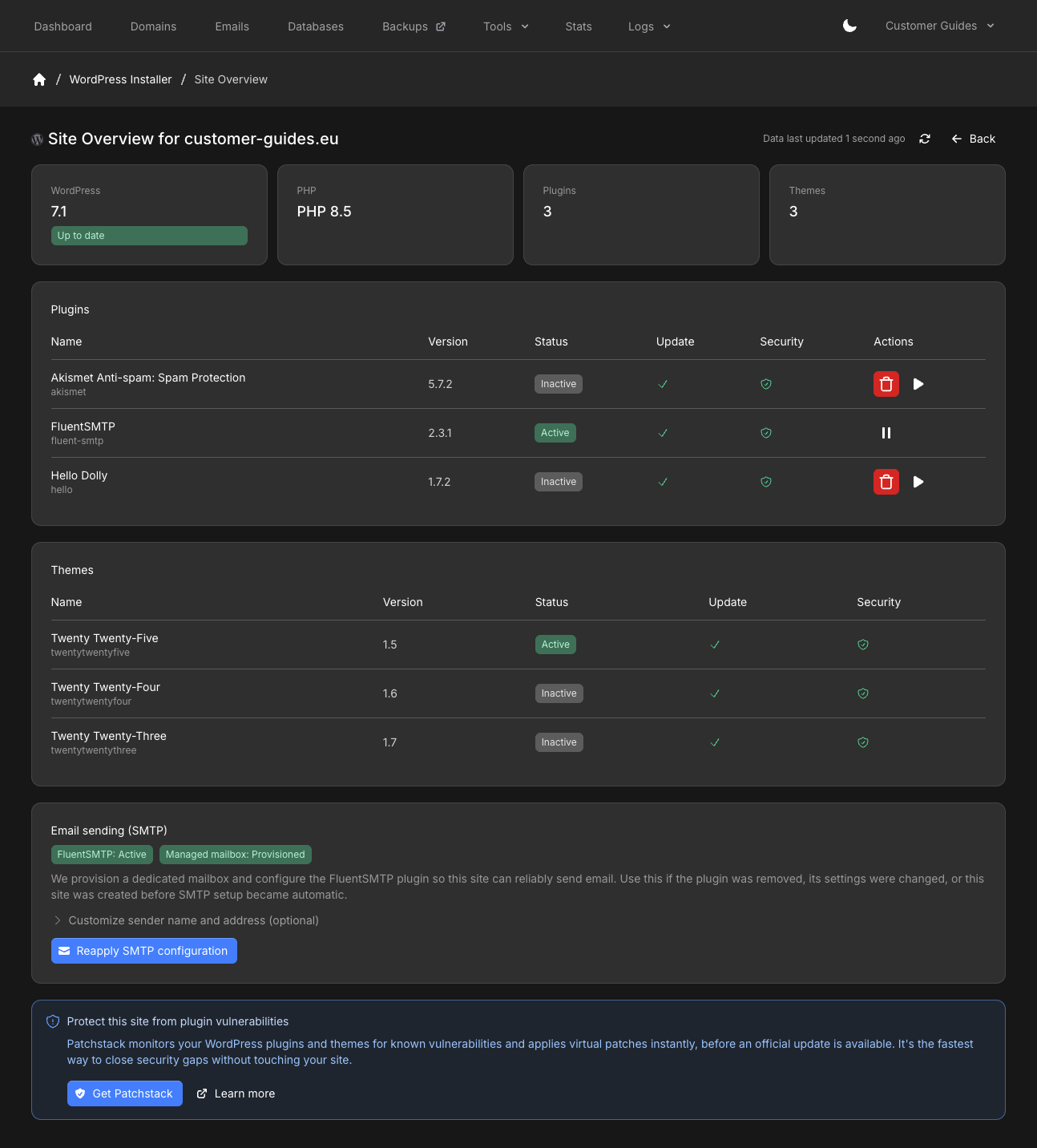
 **Site Overview** shows WordPress version (and whether it is up to date), PHP version, plugin count, and theme count.
 ## Scan for WordPress
If WordPress was installed outside the installer, click **Scan for WordPress** on the WordPress Installer page. The scan looks for existing installations on the account so you can attach them and open Overview.
## Manage plugins
The plugins table lists **Name**, **Version**, **Status** (**Active** or **Inactive**), **Update**, and **Security**.
* **Activate** or **deactivate** from the row actions
* **Delete** (trash icon) removes the plugin from the site. That cannot be undone from Overview
* When an update is available, the Plugins card shows how many updates are waiting. Update from the plugins table
Update or remove plugins during a maintenance window on production sites. A plugin update can change how the site behaves.
## Email sending (SMTP)
The **Email sending (SMTP)** section shows whether **FluentSMTP** is active and whether a **managed mailbox** is provisioned.
Overview can deploy FluentSMTP and a mailbox for sites that were not originally set up with our installer. Click **Reapply SMTP configuration** if WordPress was restored from a backup (for example Duplicator) and the old mailbox password no longer matches.
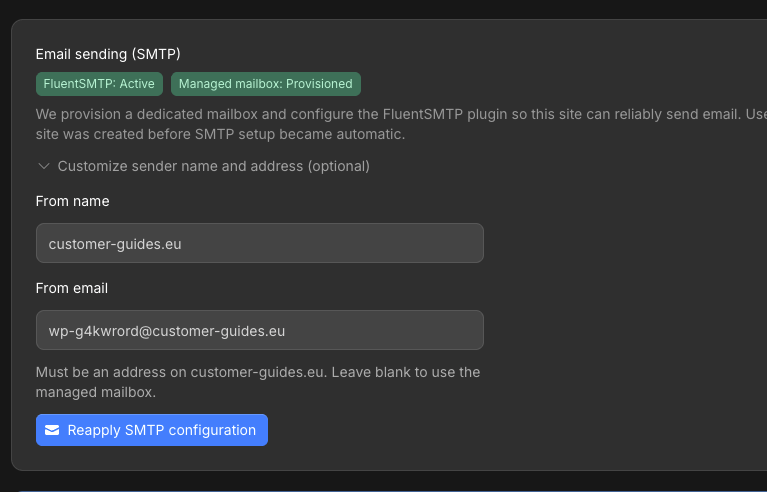
Expand **Customize sender name and address (optional)** to set:
* **From name**
* **From email** — must be an address on that site’s domain. Leave blank to use the managed mailbox.
## Scan for WordPress
If WordPress was installed outside the installer, click **Scan for WordPress** on the WordPress Installer page. The scan looks for existing installations on the account so you can attach them and open Overview.
## Manage plugins
The plugins table lists **Name**, **Version**, **Status** (**Active** or **Inactive**), **Update**, and **Security**.
* **Activate** or **deactivate** from the row actions
* **Delete** (trash icon) removes the plugin from the site. That cannot be undone from Overview
* When an update is available, the Plugins card shows how many updates are waiting. Update from the plugins table
Update or remove plugins during a maintenance window on production sites. A plugin update can change how the site behaves.
## Email sending (SMTP)
The **Email sending (SMTP)** section shows whether **FluentSMTP** is active and whether a **managed mailbox** is provisioned.
Overview can deploy FluentSMTP and a mailbox for sites that were not originally set up with our installer. Click **Reapply SMTP configuration** if WordPress was restored from a backup (for example Duplicator) and the old mailbox password no longer matches.
Expand **Customize sender name and address (optional)** to set:
* **From name**
* **From email** — must be an address on that site’s domain. Leave blank to use the managed mailbox.
 New installs and clones through **WordPress Installer** still get FluentSMTP automatically when no other SMTP plugin is detected. See [Default WordPress SMTP configuration](/docs/grid-hosting/wordpress/default-wordpress-smtp-config).
## Known vulnerabilities
When a plugin has a known issue, Overview shows **Known vulnerabilities detected** and asks you to review the details.
New installs and clones through **WordPress Installer** still get FluentSMTP automatically when no other SMTP plugin is detected. See [Default WordPress SMTP configuration](/docs/grid-hosting/wordpress/default-wordpress-smtp-config).
## Known vulnerabilities
When a plugin has a known issue, Overview shows **Known vulnerabilities detected** and asks you to review the details.
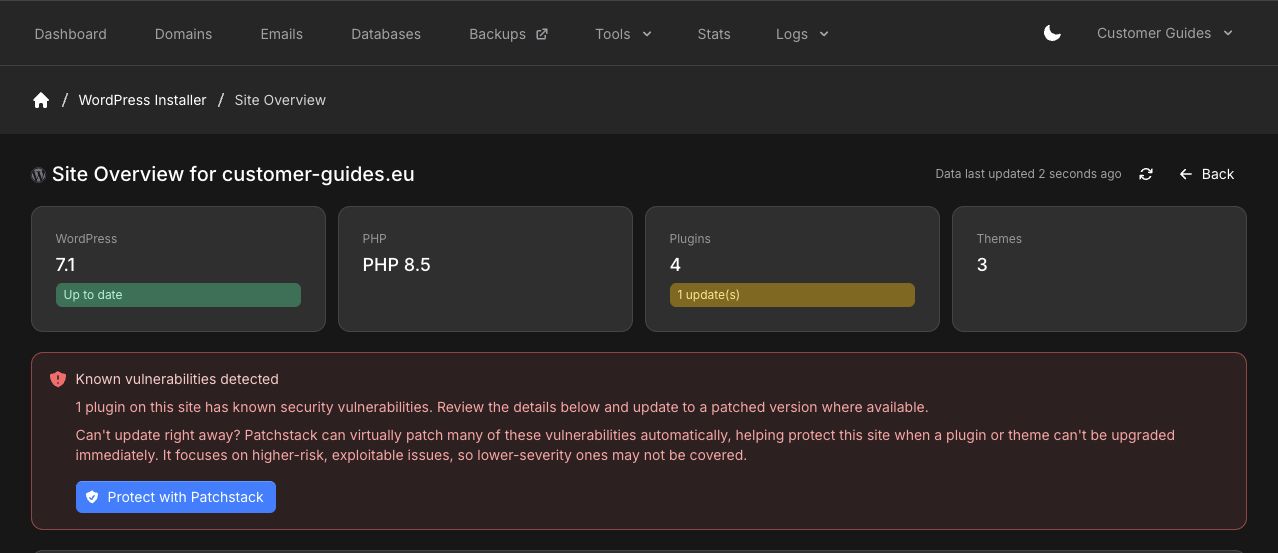 The **Known vulnerabilities** list names the plugin and a **CVSS** score. Expand a row for more detail. Update to a patched version when one is available.
 If you cannot update immediately, **Protect with Patchstack** (or **Get Patchstack** when none is detected) is the paid add-on for monitoring and virtual patching. See [Patchstack](/docs/grid-hosting/tools/patchstack).
## Related articles
* [Default WordPress SMTP configuration](/docs/grid-hosting/wordpress/default-wordpress-smtp-config)
* [Patchstack](/docs/grid-hosting/tools/patchstack)
* [Valkey Manager](/docs/grid-hosting/tools/valkey-manager)
If you cannot update immediately, **Protect with Patchstack** (or **Get Patchstack** when none is detected) is the paid add-on for monitoring and virtual patching. See [Patchstack](/docs/grid-hosting/tools/patchstack).
## Related articles
* [Default WordPress SMTP configuration](/docs/grid-hosting/wordpress/default-wordpress-smtp-config)
* [Patchstack](/docs/grid-hosting/tools/patchstack)
* [Valkey Manager](/docs/grid-hosting/tools/valkey-manager)