

.dk domains to PerfGrid. You start it at Punktum dk, which sends us the domains and their auth codes, so you never copy a code. To copy the auth code yourself instead, see Transfer a .dk domain to PerfGrid.
1
Choose PerfGrid at Punktum dk
In Punktum dk’s self-service portal, open the domain, choose PerfGrid as its new registrar and agree that Punktum dk shares the details with us. The Danish article Hvordan får du AUTH-ID fra punktum.dk shows these screens.
2
Check the cart
Punktum dk sends you on to the console’s cart, with the domains in it. Domains that couldn’t be added are listed under Not added: with the reason. Each domain keeps its current nameservers: to change that, open Domain details, as for any .dk transfer.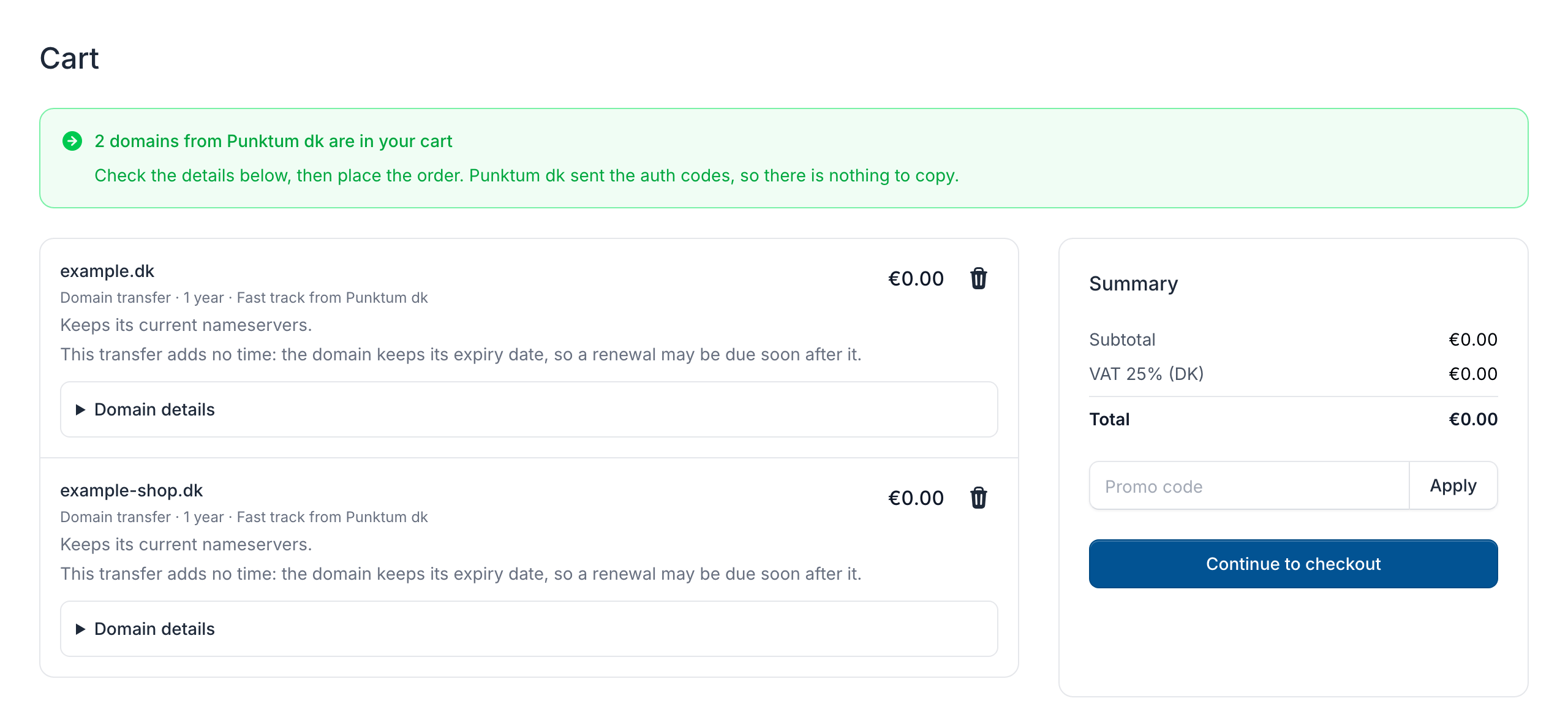
3
Check out
Click Continue to checkout, and log in or create a login. A new login’s form is filled in from the details Punktum dk sent: check them.
4
Accept and place the order
Tick the boxes under Agreement with Punktum dk and I accept the terms and conditions, then click Place order.
The link from Punktum dk works for 14 days, also on another device, until the domains are ordered. If the cart says This link from Punktum dk doesn’t work any more, start again at Punktum dk.