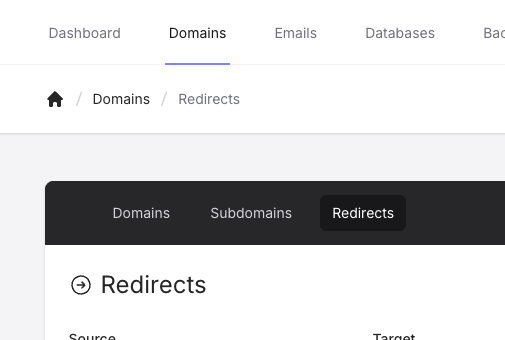
You can configure redirects for a domain by going to the Domains page and then Redirect in the sub-menu.
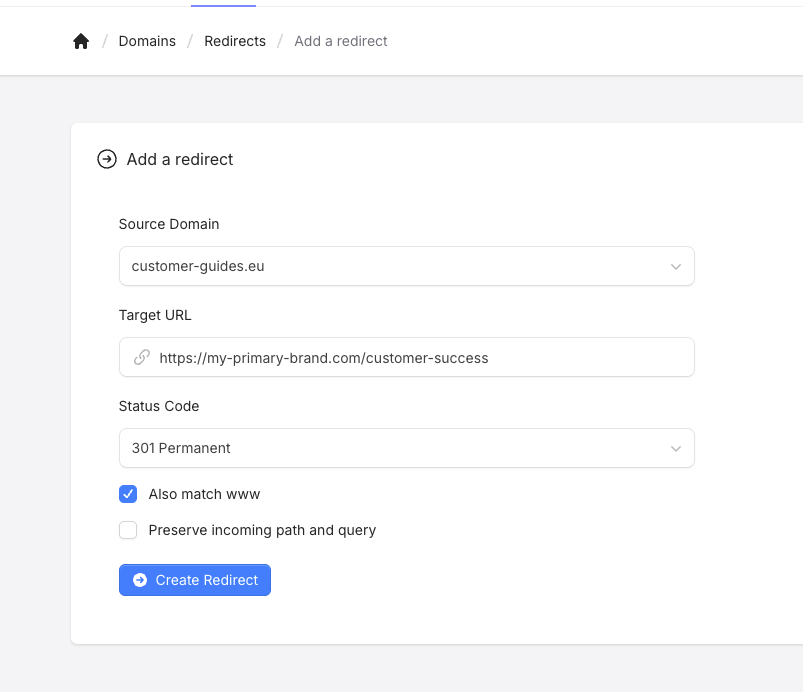
Click on the Add Redirect button to create a new redirect, this will bring you a form where you select your Source Domain and the Target URL as well as the Status Code, and a few other options.
You can then click the Create Redirect button to create the redirect. The changes will apply and propagate to the system within 10-15 seconds.
The options you can configure are:
Status Code:
301 - Permanent Redirect
302 - Temporary Redirect
Also match www:
If enabled, then the redirect covers both www and non-www of the source domain.
Preserve incoming path and query:
If enabled, then the redirect will preserve the incoming path and query parameters, a few examples of how this works:
With the option disabled:
| Source URL | Target URL | Final URL |
|---|
https://example.com/ | https://example.net/ | https://example.net/ |
https://example.com/path?query=value | https://example.net/redirect | https://example.net/redirect |
With the option enabled:
| Source URL | Target URL | Final URL |
|---|
https://example.com/ | https://example.net/ | https://example.net/ |
https://example.com/path?query=value | https://example.net/redirect | https://example.net/redirect/path?query=value |
All redirects are applied through the domain’s virtual host configuration, so it’s processed at webserver level, prior to any .htaccess rules being processed.